NetSuite Custom Fields
You can find the below customFieldList field name in all NetSuite Objects, use it to pass the custom fields list as a part of any create/update request.
Field Name | Date Type | Description |
|---|---|---|
customFieldList | CustomFields | Custom Fields and their values. |
Let's see how to add the custom fields in the request and what format the data is to be given:
CustomFields
Field Name | Data Type | Description |
|---|---|---|
customField | CustomFieldInfo[] | List of CustomField Info |
CustomFieldInfo
Field Name | Data Type | Description |
|---|---|---|
fieldType* | String | Specify the Data Type of a Custom Field. First, know what is the NetSuite Custom Field Type of the Custom Field, so we can see what fieldType value is to be selected from the Custom Field Types. |
internalId | String | Internal ID of the NetSuite Custom Field. |
scriptId* | String | NetSuite Custom Field API Name |
value | String | The value of the Custom Field. Required and returned for all the custom fields other than “select” (fieldType) |
valueLookup | LookupRecord | The Internal ID of the Custom Lookup/Picklist Field. Required and returned for the fieldType “select” |
The values of NetSuite Custom Field Type (helps in knowing the fieldType) and the NetSuite Custom Field API Name (scriptId) can be known either by logging into NetSuite or going to the Custom Fields Tab on the Breadwinner for NetSuite page in Salesforce in case of Standard NetSuite Objects.
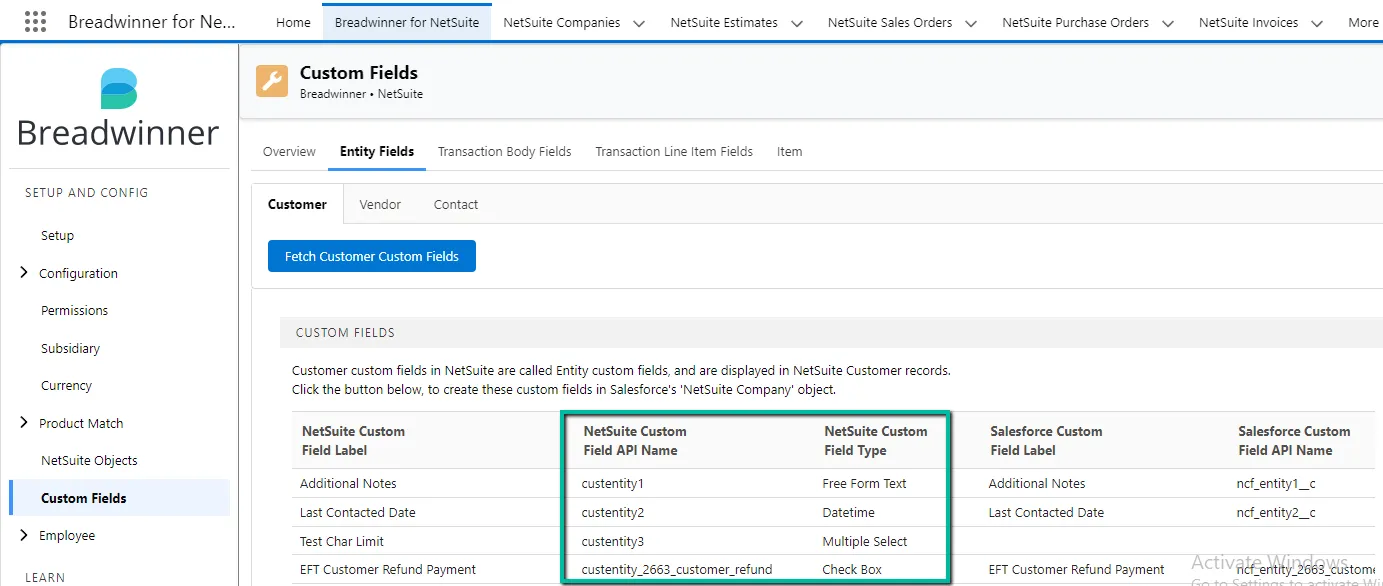
Custom Field Types
NetSuite Field Type | fieldType Value | Value |
|---|---|---|
Date | date | The date value is accepted and returned as a Unix timestamp in seconds. |
DateTime | date | The date-time value is accepted and returned as a Unix timestamp in seconds. |
List Record (Lookup) | select | Internal ID of the NetSuite record or List element |
Integer Number | long | |
Decimal Number | double | |
Currency | double | |
Percent | double | |
Check Box | boolean | TRUE/FALSE |
Free Form Text | string | |
Text Area | string | |
Long Text | string | |
Email Address | string | Email format |
Hyperlink | string | Domains & Websites |
Below is an example of constructing the Customer custom fields as a part of the request:
//  Create a Map to store all the data of a Customer
Map<String, Object> nsCustomer = new Map<String, Object>();
//  Initializing the Customer Custom Fields
    List<Object> custCustomFieldList = new List<Object>();

    // 1. Check Box custom fields
    Map<String, Object> custCustomField1 = new Map<String, Object>();
        custCustomField1.put('fieldType', 'boolean');
        custCustomField1.put('scriptId', 'custentity_naw_trans_need_approval');
        custCustomField1.put('value', 'true');
        custCustomFieldList.add(custCustomField1);

    // 2. Free Form Text, Text Area, Long Text, Email Address, and Hyperlink custom fields
    Map<String, Object> custCustomField2 = new Map<String, Object>();
        custCustomField2.put('fieldType', 'string');
        custCustomField2.put('scriptId', 'custentity_my_brn');
        custCustomField2.put('value', 'U72200MH2009PLC123456');
        custCustomFieldList.add(custCustomField2);

    // 3. Date and DateTime custom fields
    Map<String, Object> custCustomField3 = new Map<String, Object>();
        custCustomField3.put('fieldType', 'date');
        custCustomField3.put('scriptId', 'custentity_document_date');
        custCustomField3.put('value', '1628091060');
        custCustomFieldList.add(custCustomField3);

    // 4. Integer Number custom fields
    Map<String, Object> custCustomField4 = new Map<String, Object>();
        custCustomField4.put('fieldType', 'long');
        custCustomField4.put('scriptId', 'custentity_stc_daysuntilexpiry');
        custCustomField4.put('value', '7');
        custCustomFieldList.add(custCustomField4);

    // 5. Decimal Number, Currency, Percent custom fields
    Map<String, Object> custCustomField5 = new Map<String, Object>();
        custCustomField5.put('fieldType', 'double');
        custCustomField5.put('scriptId', 'custentity_stc_discountpercent');
        custCustomField5.put('value', '76.89');
        custCustomFieldList.add(custCustomField5);

    // 6. List Record/Lookup custom fields
    Map<String, Object> custCustomField6 = new Map<String, Object>();
        custCustomField6.put('fieldType', 'select');
        custCustomField6.put('scriptId', 'custentity_rating');
        custCustomField6.put('valueLookup', new Map<String, Object>{'internalId'=>'2'});
        custCustomFieldList.add(custCustomField6);

    // 7. custom segment fields
    Map<String, Object> custCustomField7 = new Map<String, Object>();
        custCustomField7.put('fieldType', 'select');
        custCustomField7.put('scriptId', 'cseg_lead_source');
        custCustomField7.put('valueLookup', new Map<String, Object>{'internalId'=>'2'});
        custCustomFieldList.add(custCustomField7);

//  Adding the Customer Custom Fields
    nsCustomer.put('customFieldList', new Map<String, Object>{'customField'=>custCustomFieldList});
Date / DateTime Custom Fields
Date: The date value is accepted and returned as a Unix timestamp in seconds.
Example:
custCustomField1.put('fieldType', 'date');
custCustomField1.put('scriptId', 'custentity_date');
custCustomField1.put('value', DateTime.newInstance(2026, 01, 09).getTime()/1000); // no time part when constructing Unix Timestamp
Because a timestamp includes a time factor, when we use a Salesforce Date field value for the Unix timestamp, it represents the Salesforce time based on the Salesforce timezone. Hence, when it is sent to NetSuite, it will be saved one day ahead or behind. To resolve this issue, we need to construct a timestamp in GMT with a 12-hour time, so it does not cause any problems and adjusts itself in case of extreme Salesforce and NetSuite timezone differences.
custCustomField1.put('value', DateTime.newInstanceGMT(dateToBeConverted.year(), dateToBeConverted.month(), dateToBeConverted.day(), 12, 0, 0).getTime()/1000);Date Time: The date-time value is accepted and returned as a Unix timestamp in seconds.
Example:
custCustomField2.put('fieldType', 'date');
custCustomField2.put('scriptId', 'custentity_datetime');
custCustomField2.put('value', DateTime.newInstance(2026, 01, 09, 15, 0, 0).getTime()/1000); // with time part when constructing Unix Timestamp